
The Sioux Center Public Library has partnered with KultureCity to improve our ability to assist and accommodate guests with sensory needs. Our objective is to provide an inclusive and seamless experience for all guests for all events including those with sensory need, such as individuals who may be sensitive to noise, bright lights, crowds, or unfamiliar environments. We strive to raise awareness of the needs and challenges faced by individuals with sensory processing disorders by supplying our library staff with continuous training and by offering the resources and accommodations below to our guests.
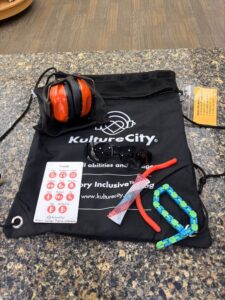
![KultureCity sensory inclusive bag with noise-cancelling headphones, fidget tools, communication card, and strobe reduction sunglasses]() Sensory Inclusive Bags
These sensory bags are available at the circulation desk for free use within the library. To borrow a bag, simply ask staff for a sensory bag and they’ll check it out on your library card. If you don’t have a library card, you can fill out a guest pass slip to borrow the sensory bag.
Contents
- noise cancelling headphones
- verbal cue card
- KultureCity VIP lanyard
- 3 fidget tools
- strobe reducing sunglasses
Weighted Lap Pad
A weighted lap pad is also available upon request at our circulation desk for free use within the library. To borrow the weighted lap pad, simply ask staff for it and they’ll check it out on your library card. If you don’t have a library card, you can fill out a guest pass slip to borrow the weighted lap pad.
Social Story and KultureCity All-Inclusive App
Download the KultureCity All-Inclusive App below to get your social story to help you further with your visit to the Sioux Center Public Library.
iPhone – App Store
Android – Google Play
Sioux Center Library Trained for Sensory Needs
Read the article the Sioux Center News published about the library’s sensory-inclusive certification.
